WinTV-PVR-250MCE brings live TV, FM radio and TV recording to Windows XP Media Center Edition
Add TV and FM radio to your Windows XP Media Center Edition PC with the Hauppauge WinTV-PVR-250MCE. The WinTV-PVR-250MCE has excellent TV video quality, plus adds FM radio.
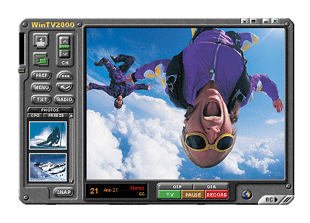
The WinTV-PVR-250MCE runs under Windows XP, too! You can also use the WinTV-PVR-250MCE to watch TV in a window and record your TV shows into an MPEG format with WinTV2000, our TV application which is bundled with WinTV-PVR-250MCE.
And if you're using a third party TV application like Snapstream's BeyondTV or Frey's SageTV, the WinTV-PVR-250MCE is perfect for you. WinTV-PVR-250MCE is also supported by applications like MythTV, and more!
|
For Windows XP Media Center Edition users: |
 |
Watch TV with the MyTV button |
|
|
Use the Media Center Edition TV scheduler to record your TV shows to disk. |
|
|
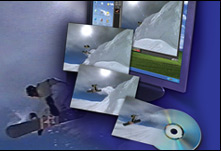
WinTV-PVR-250MCE's built-in hardware MPEG encoder allows you to continue to use your computer while recording. Listen to music, watch digital pictures or play a DVD movie while recording! |
|
|
Listen to FM radio while you work on your PC. |
|
|
Record your home videos to disk. WinTV-PVR-250MCE includes audio/video inputs to connect to VCRs and camcorders. |
|
|
Note: the MCE remote control is used to control the TV window under Windows XP MCE 2004. |
|
For Windows XP users: |
|
|
Watch TV in a window on your PC screen (any size), or watch TV full screen! |
|
|
Record your home videos and TV shows to disk using MPEG compression. The built-in hardware MPEG encoder allows you to continue to use your computer while recording. Surf the net or answer e-mail while digitally recording to your PC's hard disk! |
|
|
Schedule your TV recordings with WinTV-Scheduler. The Electronic Program Guides TitanTV.com in the U.S., TVTV.de in Europe and iEPG in Japan, are Internet based program guides which work with WinTV-PVR to help schedule your TV recordings. |
|
|
Pause and instantly replay your TV shows, with 2X and 8x digital fast forward and rewind. |
|
|
Capture high quality still video images from live or recorded TV. |
|
|
Edit your TV shows or home videos with the Hauppauge MPEG Editor. |
|
|
With the included DVD MovieFactory, you can create DVD or CDs from your recordings. |
|
|
Supports great TV watching applications like Snapstream, SageTV and Showshifter! |
|
|
Note: there is no remote control for use under Windows XP. |
|
WinTV-PVR-250MCE includes: |
|
|
125 channel cable ready TV tuner |
|
|
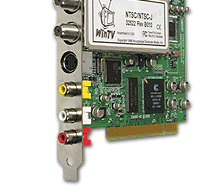
Composite/s-video plus stereo audio inputs to connect to VCR, camcorders or set top boxes |
|
|
High quality MPEG1/MPEG2 video and audio encoder based on the Conexant -416 MPEG encoder |
|
|
dbx-TV stereo decoder (Nicam stereo decoder in Europe) |
|
|
FM radio receiver |
The WinTV-PVR-250MCE's TV tuner and S-Video/composite video inputs are for either PAL or NTSC.
|
MPEG record specifications (under Windows XP): |
|
|
MPEG2 record datarates: |
|
|
2MBit/sec, 4MBit/sec, 6Mbit/sec, 8Mbit/sec, 12Mbit/sec.
Selections for DVD Standard play (8MBitsec), DVD Long Play (4MBit/sec) and DVD Extra Long Play (2MBit/sec) |
|
|
NTSC format* at 29.97fps: Full D1: 720x480, MPEG1: 352x240 |
|
|
PAL format* at 25fps: Full D1: 720x576, MPEG1: 352x288 |
|
|
Audio capture formats: 32/44.1/48 KHz, 16bit stereo, 192/224/384Kbits/sec |
|
|
Chroma sampling: YUV 4:2:0 |
|
|
Video file format: .MPG |
|
|
MPEG file tested compatible with: MediaStudio 6.0, MyDVD and DVD MovieFactory DVD authoring applications |
|
System Requirements under Windows XP: |
|
|
Processor requirements: Pentium® IV processor 1.2GHz or faster for TV pause with full screen playback |
|
|
Windows®XP, Windows XP MCE 2004, MCE 2005, Windows2000 or Windows Me |
|
|
Free PCI slot |
|
|
Sound card |
|
|
DVD or CD-RW writer (optional for burning DVD's or Video CD’s) |
|
|
VGA card (PCI or AGP) which supports video overlay (NVidia, S3, ATI, etc.) |
* Note: Creating Video CD's and S-VideoCD's requires that your PC have a CD-RW burner. Creating DVD's requires that your PC have a DVD-RW, DVD+RW or DVD-R recorder.
|